 Floating Timer Widget
A timer that stays on top of every app.
Set a countdown or start a stopwatch, then switch apps. A small draggable pill sits above whatever you are doing and keeps ticking — no going back to check.
In closed testing on Google Play right now — the listing opens once it is public.

Small app, exactly one job
Everything happens in the pill. No dashboard, no upsell, no account screen.
Timer or stopwatch
Count down to zero, or count up from it. Pick the mode before you start.
Durations to the second
Type any minutes and seconds, then save it as your own preset. Hold a preset to delete it.
Keeps running everywhere
Backgrounded, swiped away, screen off — the countdown carries on and stays visible.
Tap for controls
Pause, resume, restart, settings, close. The buttons fold away again after a few seconds.
Drag it anywhere
Move the pill out of the way of whatever you are reading. It stays put.
Your alert at zero
Choose the vibration strength, off through strong, with your notification tone on top if you want it.
What it looks like
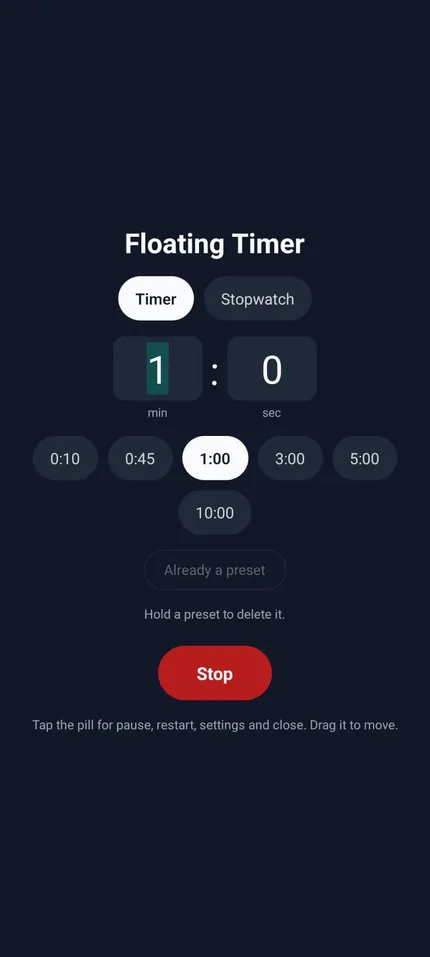

Three taps to floating
-
Choose timer or stopwatch
For a timer, type the minutes and seconds or tap one of your presets.
-
Allow “Display over other apps”
Android asks once, on a system screen. It is the permission that lets the pill draw above other apps.
-
Tap Start floating
Go anywhere on your phone. The pill follows, counting, until you close it with one tap.
Questions
Does the timer survive closing the app?
Yes. The pill belongs to a foreground service, so the count keeps going when the app is backgrounded or swiped out of recents. It stops when you close the pill.
Why does it need the overlay permission?
Drawing on top of other apps is a permission Android grants only on its own settings screen. Without it there is no floating pill. The app uses it for nothing else.
Is there an iPhone version?
No. iOS does not let an app draw over other apps, so the whole idea only works on Android.
What does it cost, and what does it collect?
It is free, has no ads and no account. Nothing leaves your phone — your presets are stored on the device and the app makes no network requests. See the privacy policy.
Android says “App was denied access” when I toggle the permission.
That is Android 15 blocking overlay for apps installed outside a store. Tap OK, then Settings → Apps → Floating Timer Widget → ⋮ → Allow restricted settings, and toggle again. Installing from Google Play skips this entirely.
Stop switching back to check the timer.
Android 8 and up. Free, no ads, works offline.